Build an AI-powered tool to streamline due diligence processes for selling companies in M&A transactions

Selling a company is painful and tedious, with endless grunt work and costly reliance on lawyers and investment bankers. We saw an opportunity to automate the most manual processes to deliver value at a fraction of the cost. The goal is to become the go-to tool for this process.

Scope

0-1 product design & development

Role

Lead product designer

Company

Zuva

Timeline

2024-2025
Understanding the experience of selling a company

Zuva CEO, CFO and I spoke with over 44 people in a variety of roles over the course of 3 months to understand the process and pain points of selling a company. The people we spoke to have been part of sell-side transactions in different capacities — from lawyers and investment bankers to executives from companies that exited. We learned that the entire process was riddled with inefficiencies and areas for improvement.

Preventable deal delays

Deals were delayed by risky contract language that could have been caught earlier.

Tedious grunt work

Sell-side teams spent significant time on manual tasks that could be automated.

Costly fees for specialized support

Certain tasks get outsourced to lawyers who charge high fees that can exceed agreed upon quotes.

Time lost to rework

Teams spent time answering the same questions twice (or more) for different buyers.

44+

Interviews

6

Personas

Lawyers, Investment bankers, Financial Services Reps, Reps & Warranty Insurers, companies that have exited

3

Months

Nov 2024 to Jan 2025

Improving a flawed process

In a collaborative workshop with the CEO, CFO, Product Manager, VP of Research and Technology and myself, we mapped the end-to-end sell-side M&A due diligence process to identify where teams encounter pain points and inefficiencies. We then re-imagined what an ideal, streamlined process could look likes and focused on ways automation could reduce manual effort and eliminate bottlenecks.

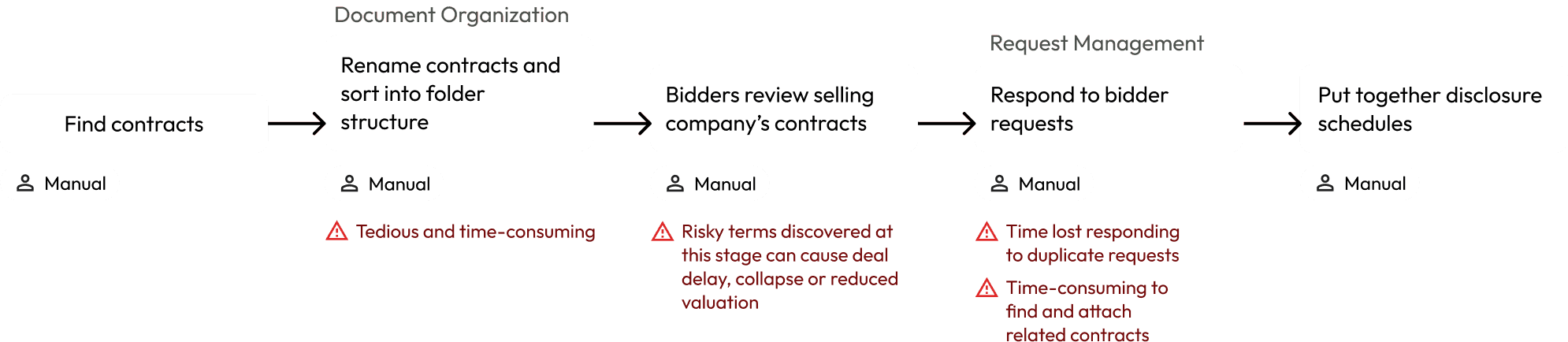
Before

How a selling company would typically prepare for sale
After

How our AI and automation can streamline the process
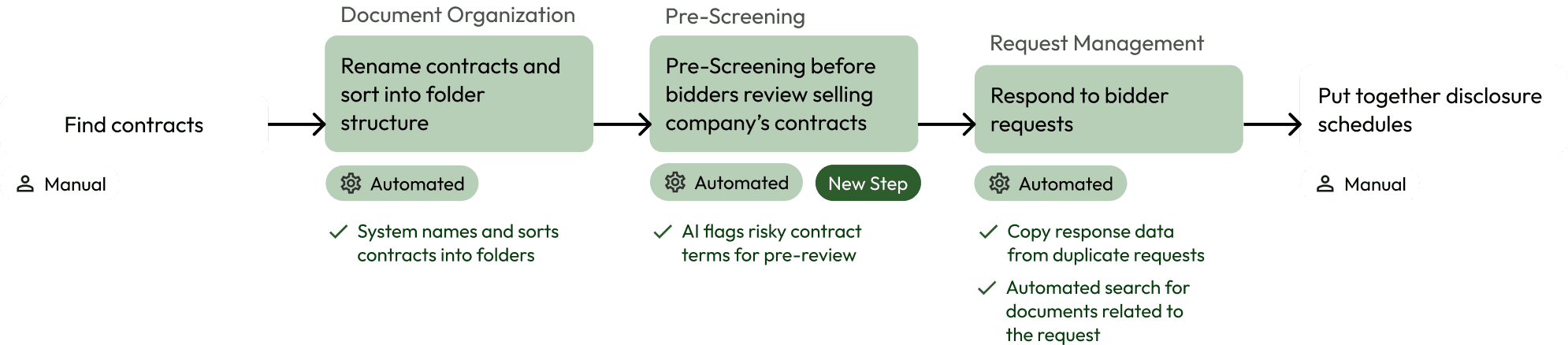
Document Organization

Automating document organization

Pain Point

Manual

Tedious grunt work

Teams spend significant time manually renaming documents, redacting confidential information and sorting them into folders, one by one.

Solution

Automated

I designed a configuration where users can define a standardized naming convention and set rules for documents to be sorted into folders based on document type.

Impact

Save time

Increase accuracy
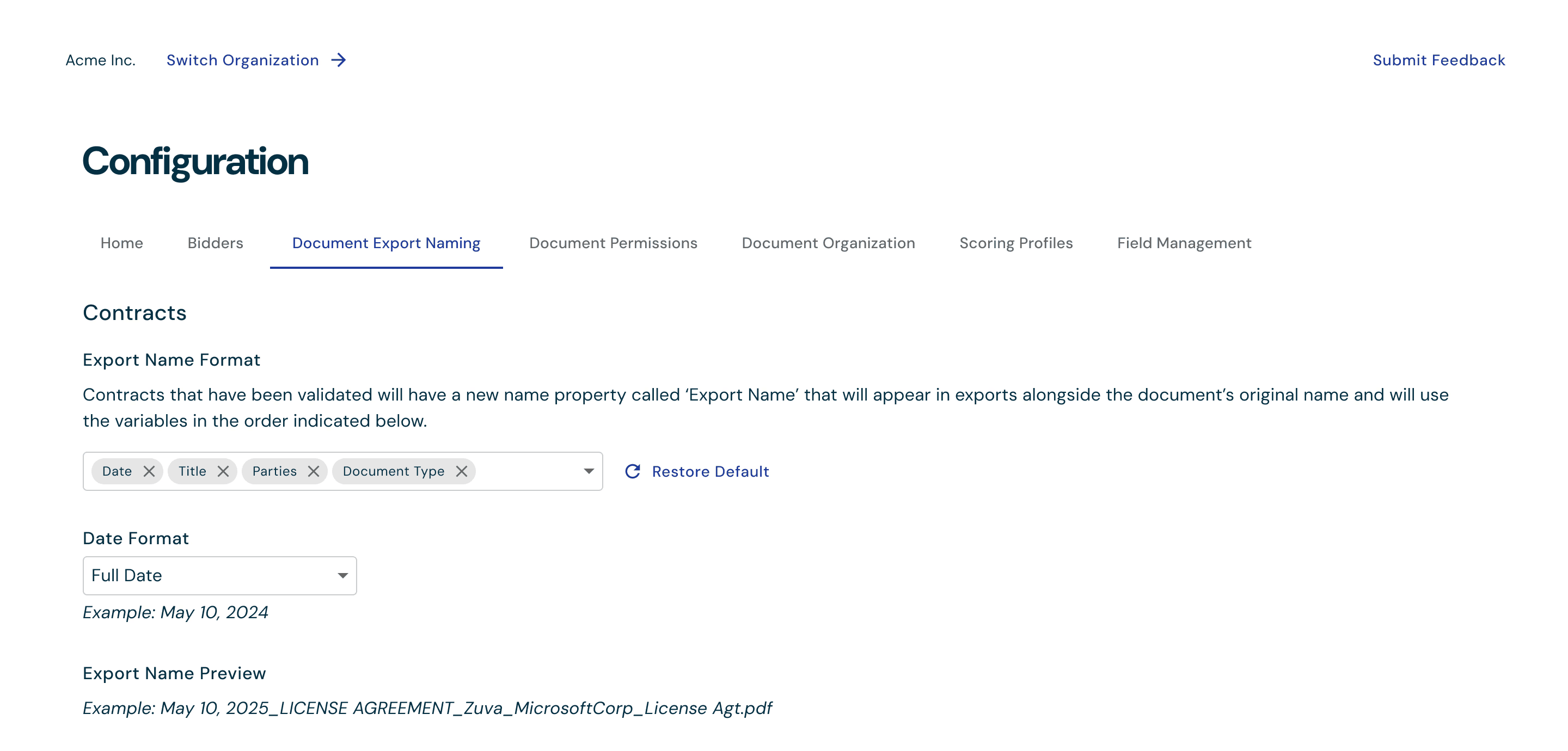
Title, parties, date are unique to every contract, so we used them as variables in the standard naming format. Dynamically updating preview provides real-time feedback to users so they can validate the changes they make before saving.

Title, parties, date are unique to every contract, so we used them as variables in the standard naming format.

Dynamically updating preview provides real-time feedback to users so they can validate the changes they make before saving.

Dynamically updating preview provides real-time feedback to users so they can validate the changes they make before saving.

Title, parties, date are unique to every contract, so we used them as variables in the standard naming format.

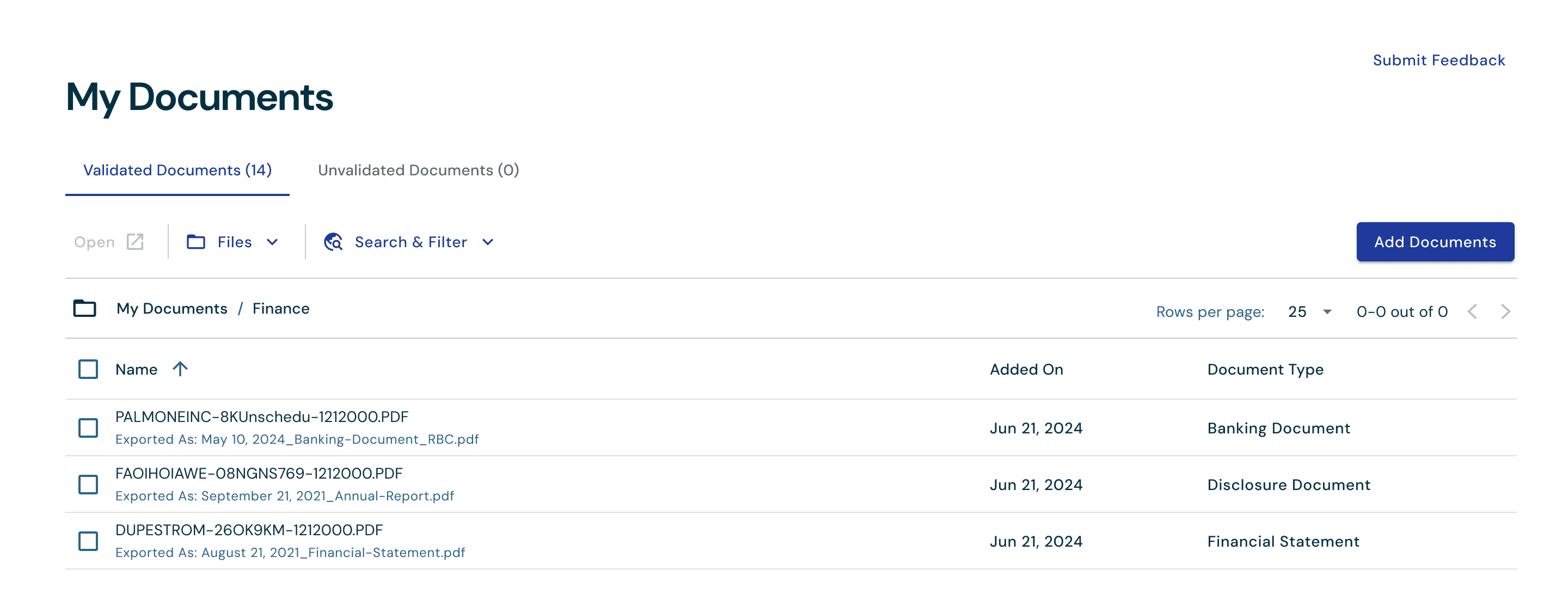
We show both the original file name (top) and the standardized name (bottom) so users can easily recognize documents they’re already familiar with

We show both the original file name (top) and the standardized name (bottom) so users can easily recognize documents they’re already familiar with

We show both the original file name (top) and the standardized name (bottom) so users can easily recognize documents they’re already familiar with.

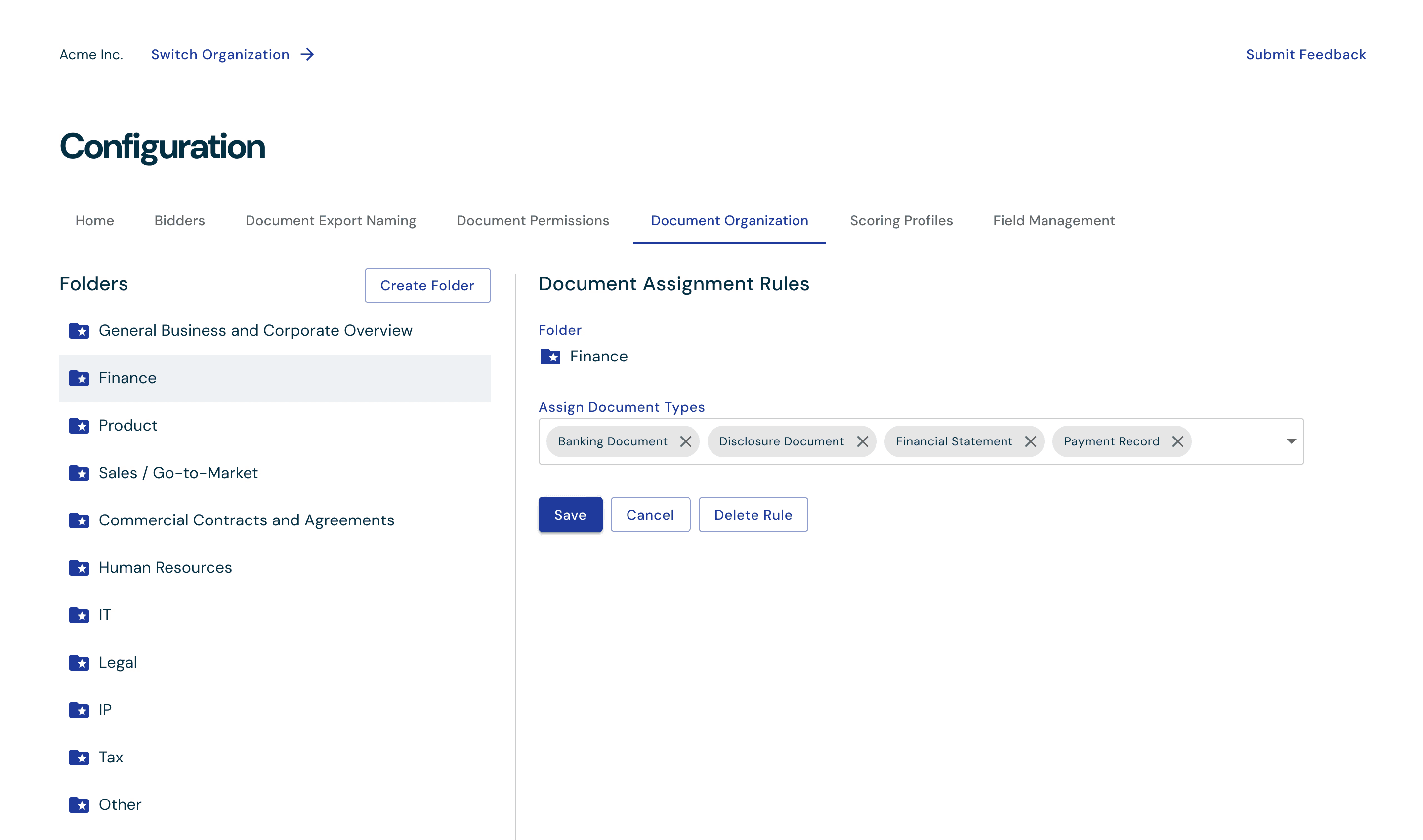
Documents get auto-sorted into folders based on the document types that are assigned to it, taking the manual work of moving documents off of the user’s plate.

Documents get auto-sorted into folders based on the document types that are assigned to it, taking the manual work of moving documents off of the user’s plate.

Documents get auto-sorted into folders based on the document types that are assigned to it, taking the manual work of moving documents off of the user’s plate.

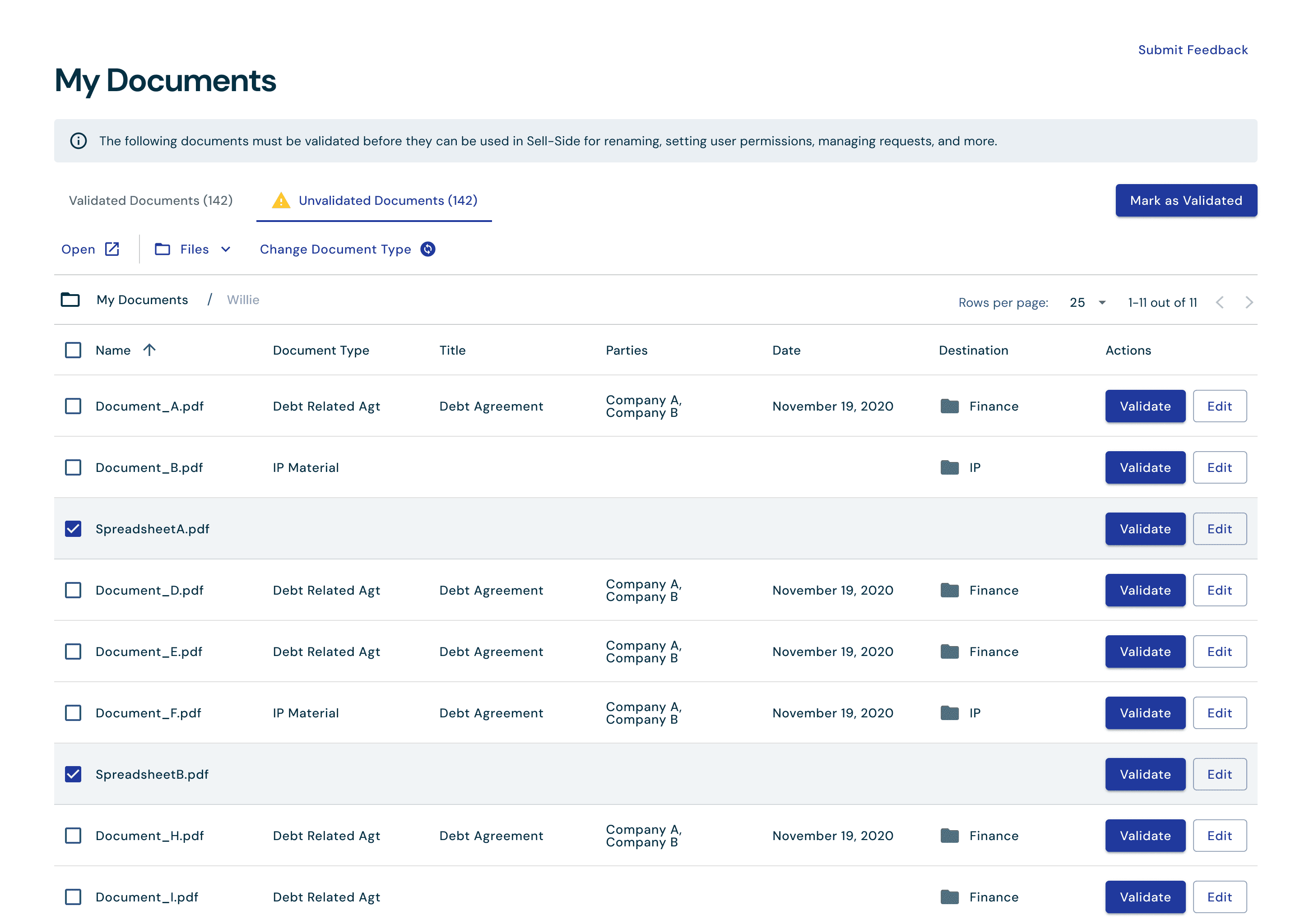
Our AI reads uploaded documents and classifies their type.

When document sorting is configured, the system suggests a folder destination for all uploaded documents.

Our AI reads uploaded documents and classifies their type.

When document sorting is configured, the system suggests a folder destination for all uploaded documents.

Our AI reads uploaded documents and classifies their type. When document sorting is configured, the system suggests a folder destination for all uploaded documents.

Pre-Screening

Uncovering risky contract terms early

Pain Point

Preventable deal delays

Costly fees for specialized support

Few teams proactively review their contracts for risky terms like change of control, MFN, or non-compete, leading to surprises that can delay deals or decrease valuation.

Few teams proactively review their contracts for risky terms like change of control, MFN, or non-compete, leading to surprises that can delay deals or decrease valuation.

Solution

Automated

New step

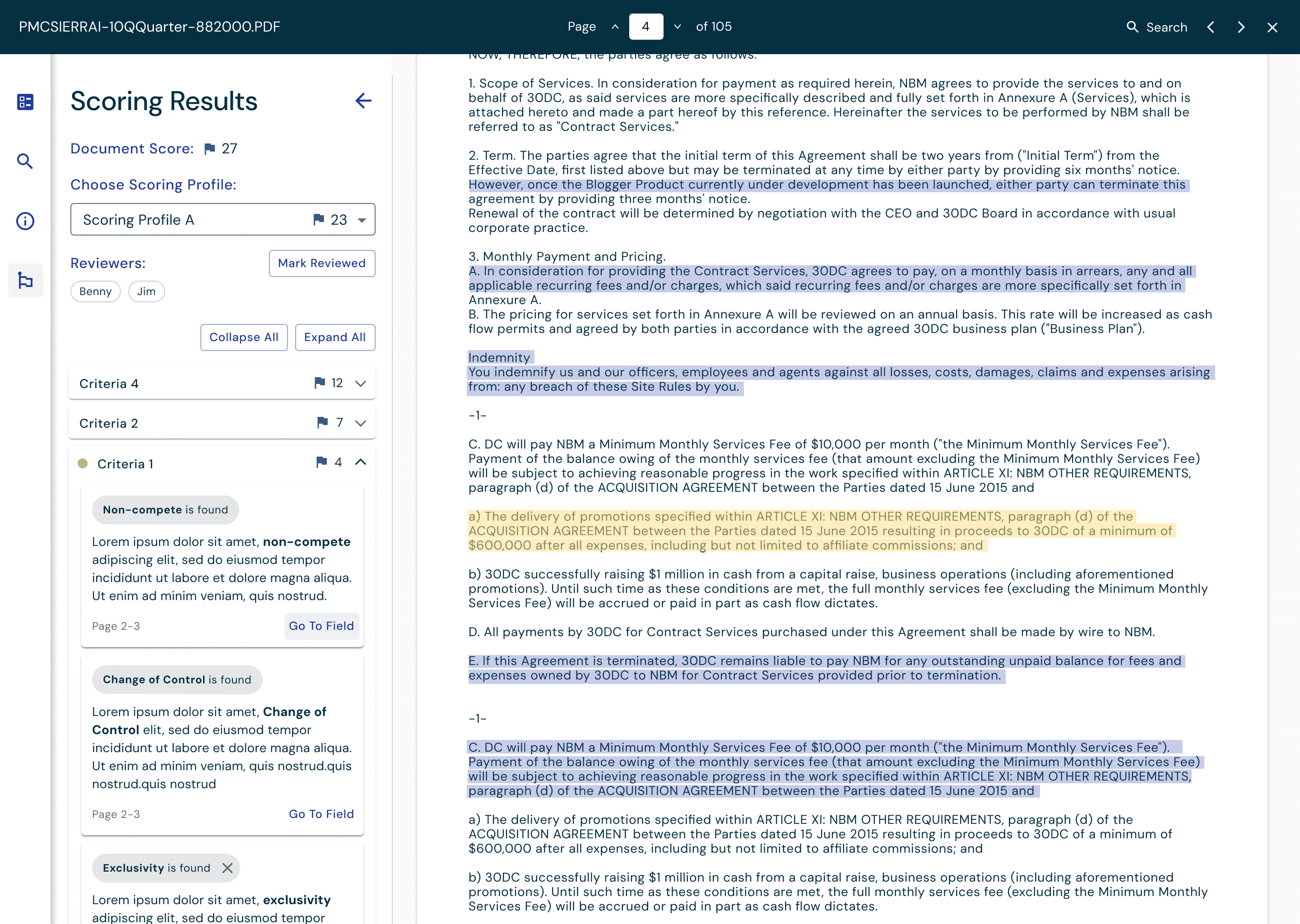
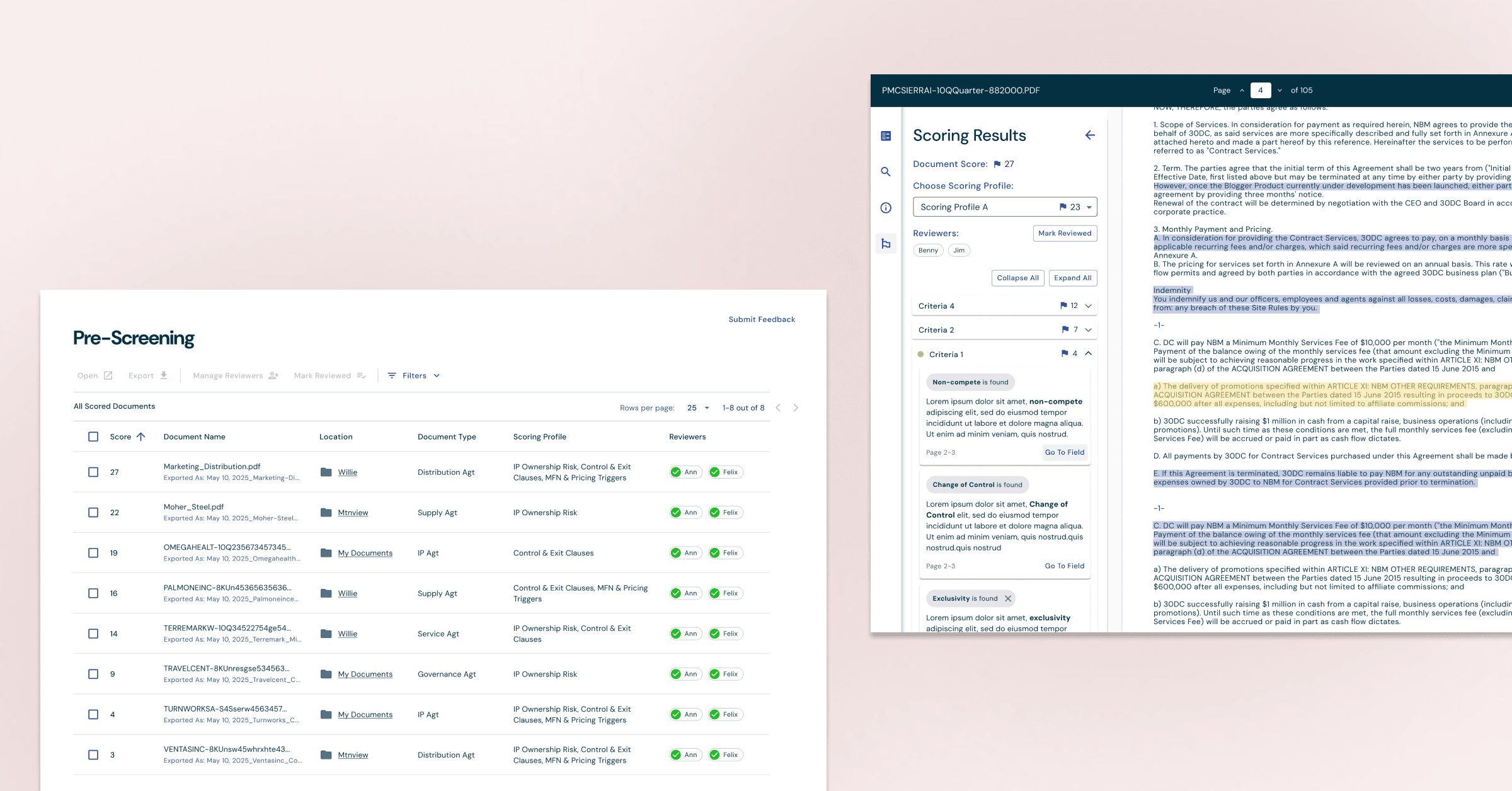
I designed Pre-Screening functionality where users can define criteria and weights for risky terms. Documents are automatically screened on upload and flagged if they meet criteria.

Impact

Catch contract risks early

Mitigate deal delays
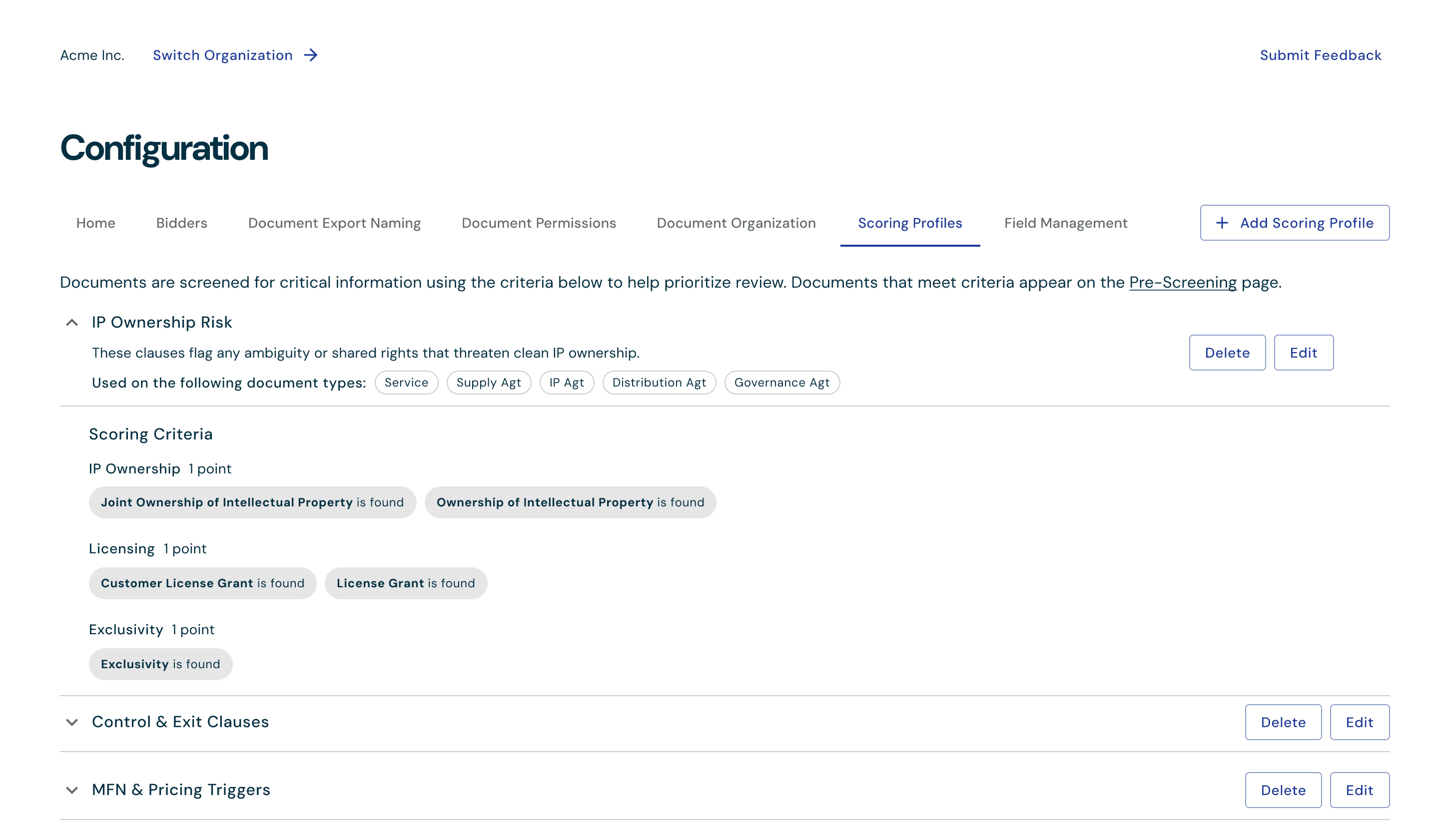
We created default criteria based on known risky terms like non-compete, exclusivity, MFN, etc. to lower the barrier of using this functionality.

We created default criteria based on known risky terms like non-compete, exclusivity, MFN, etc. to lower the barrier of using this functionality.

We created default criteria based on known risky terms like non-compete, exclusivity, MFN, etc. to lower the barrier of using this functionality.

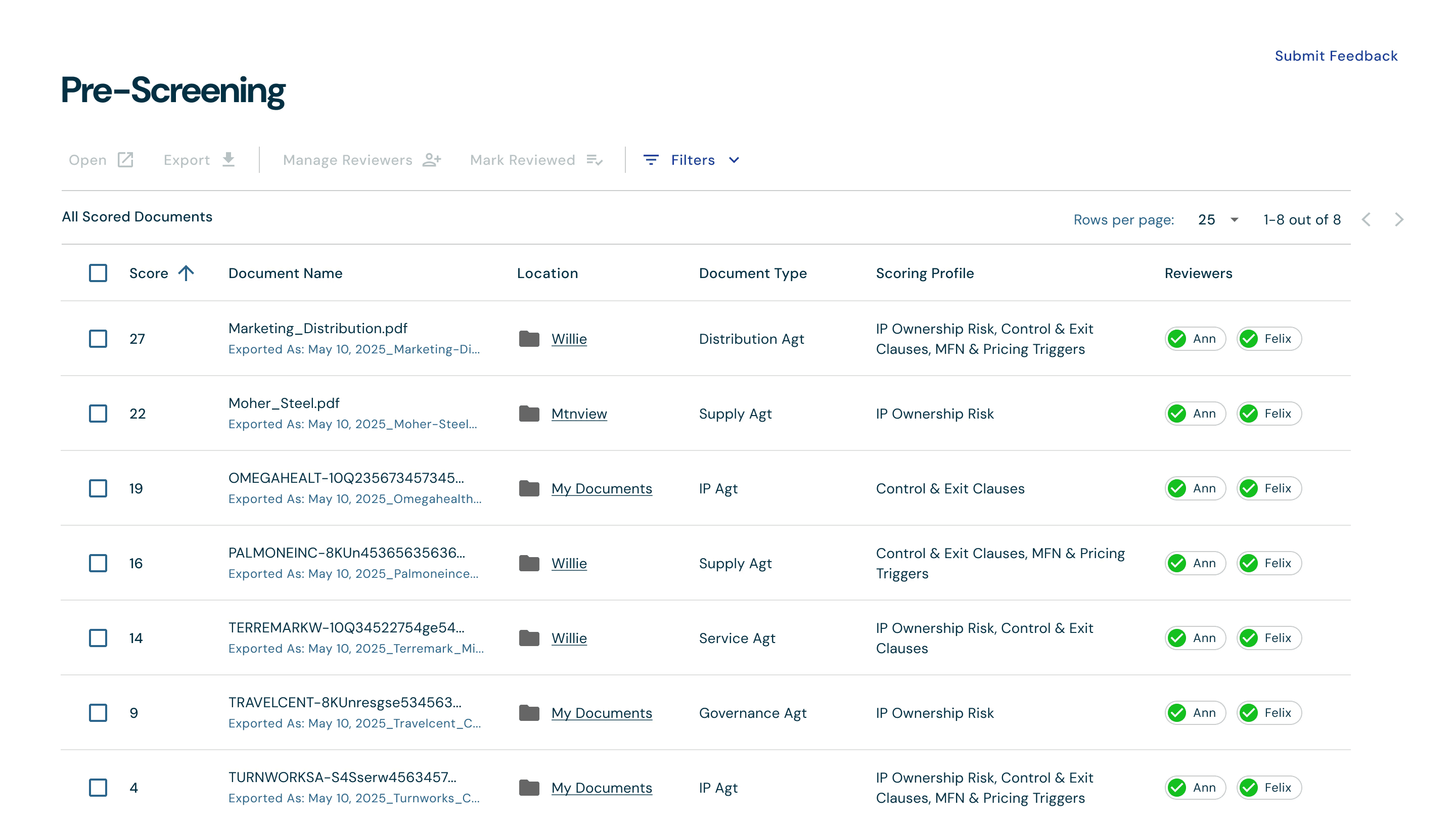
We made the first column default sorted from highest to lowest score to help users prioritize their pre-screening review.

We made the first column default sorted from highest to lowest score to help users prioritize their pre-screening review.

We made the first column default sorted from highest to lowest score to help users prioritize their pre-screening review.

To help users prioritize review within the document, we display criteria with score and enable users to ‘jump’ to the parts of the document they want to see review

To help users prioritize review within the document, we display criteria with score and enable users to ‘jump’ to the parts of the document they want to see review

To help users prioritize review within the document, we display criteria with score and enable users to ‘jump’ to the parts of the document they want to see review.

Request Management

Saving time responding to requests

Pain Point

Manual

Time lost to rework

Teams spend months in back-and-forth exchanges with multiple bidders, often answering the same questions repeatedly and manually searching for related files to attach as evidence.

Solution

Automated

I designed a request management tool that centralizes bidder requests, tracks responses, searches and attaches relevant documents, and reuses data from similar past requests.

Impact

Reducing duplicate work

Faster response time

Improving collaboration

Reusing answers for duplicate requests
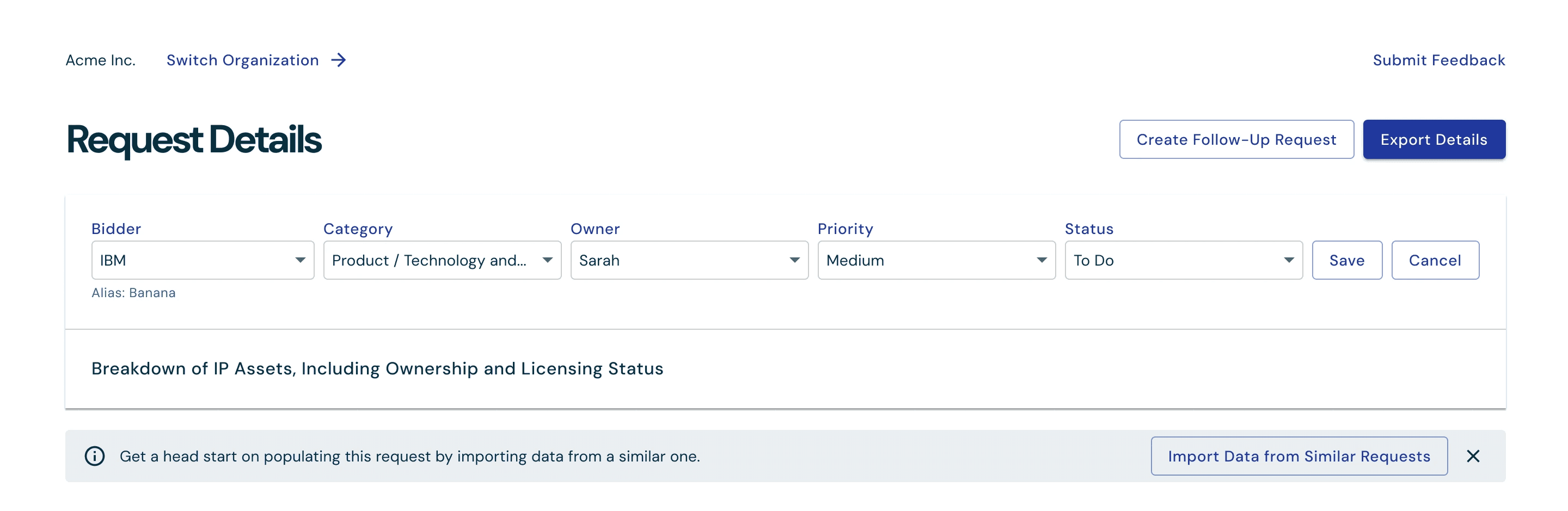
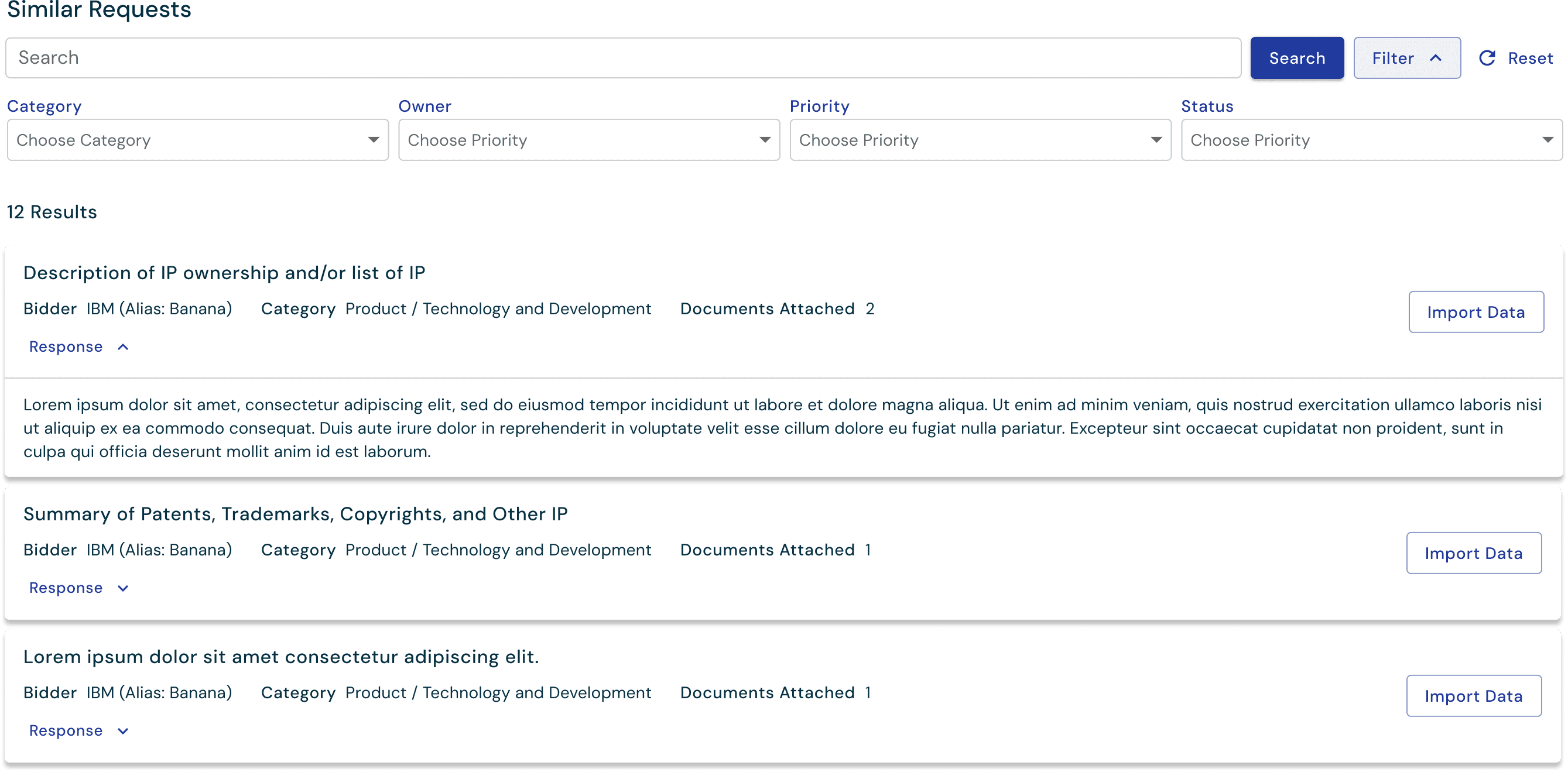
We designed a way for users to import data from already populated requests that are semantically similar to prevent rework and save time.

We designed a way for users to import data from already populated requests that are semantically similar to prevent rework and save time.

We designed a way for users to import data from already populated requests that are semantically similar to prevent rework and save time.

We show a preview of semantically similar requests with their responses and documents so users can assess whether the data is complete and worth importing.

We show a preview of semantically similar requests with their responses and documents so users can assess whether the data is complete and worth importing.

We show a preview of semantically similar requests with their responses and documents so users can assess whether the data is complete and worth importing.

Finding responsive documents without digging through the file drive

Part of the pain users experience with responding to requests, is finding documents that may be responsive to attach to the response. This usually looks like senior team members digging through file drives manually to find responsive documents, relying on memory of which folders documents were originally stored in. I designed the interface where users would search for and attach relevant documents.
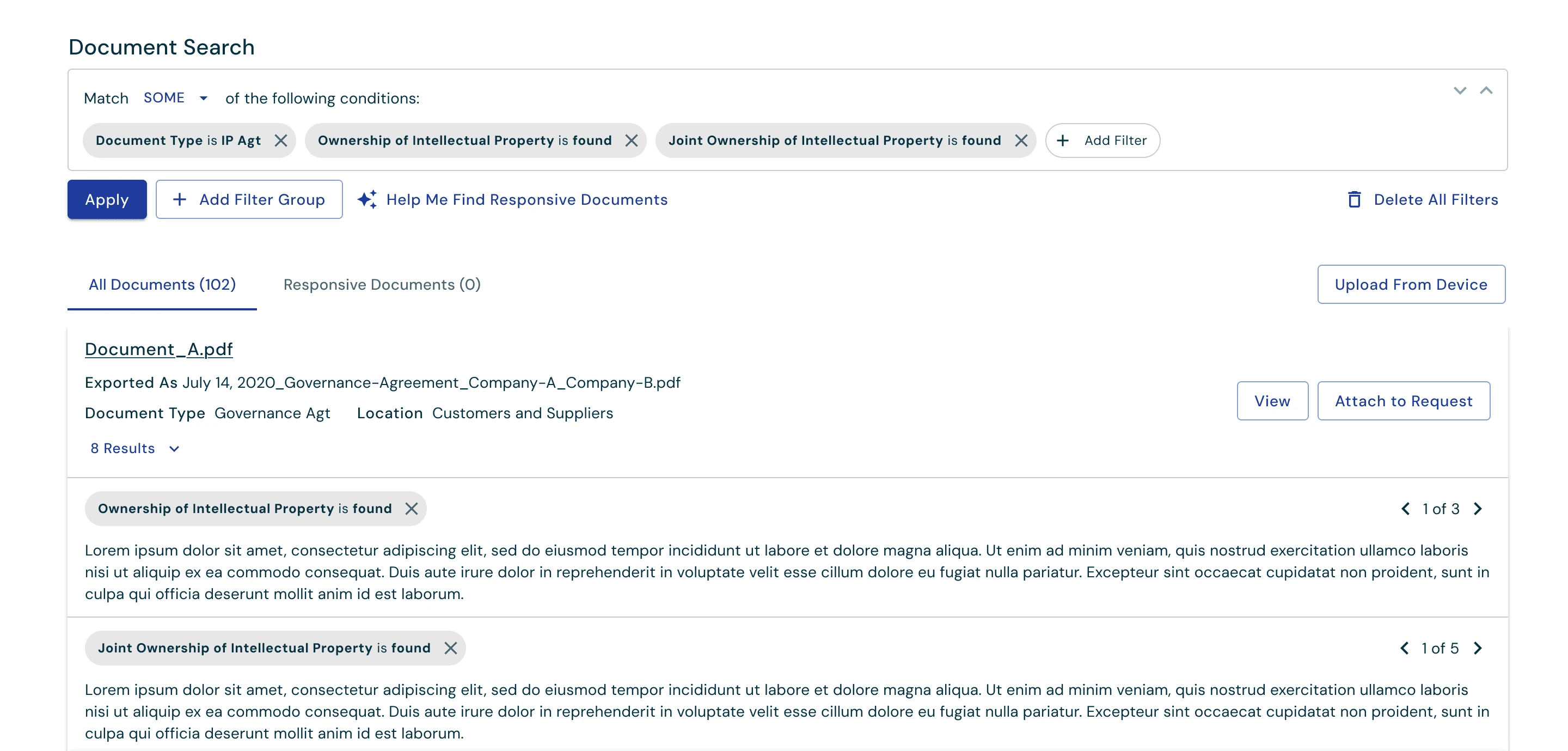
Working with our research and engineering teams, we built a way to automatically generate a search query from each request, so users can focus on reviewing and fine-tuning results instead of building searches from scratch.

We show previews of the text search results to help users decide if the document is responsive from the results page.

Working with our research and engineering teams, we built a way to automatically generate a search query from each request, so users can focus on reviewing and fine-tuning results instead of building searches from scratch.

Working with our research and engineering teams, we built a way to automatically generate a search query from each request, so users can focus on reviewing and fine-tuning results instead of building searches from scratch.

We show previews of the text search results to help users decide if the document is responsive from the results page.

Working with our research and engineering teams, we built a way to automatically generate a search query from each request, so users can focus on reviewing and fine-tuning results instead of building searches from scratch.

We built functionality to automatically generate a search query from each request, so users can focus on reviewing and fine-tuning results instead of building searches from scratch. We show previews of the text search results to help users decide if the document is responsive from the results page.

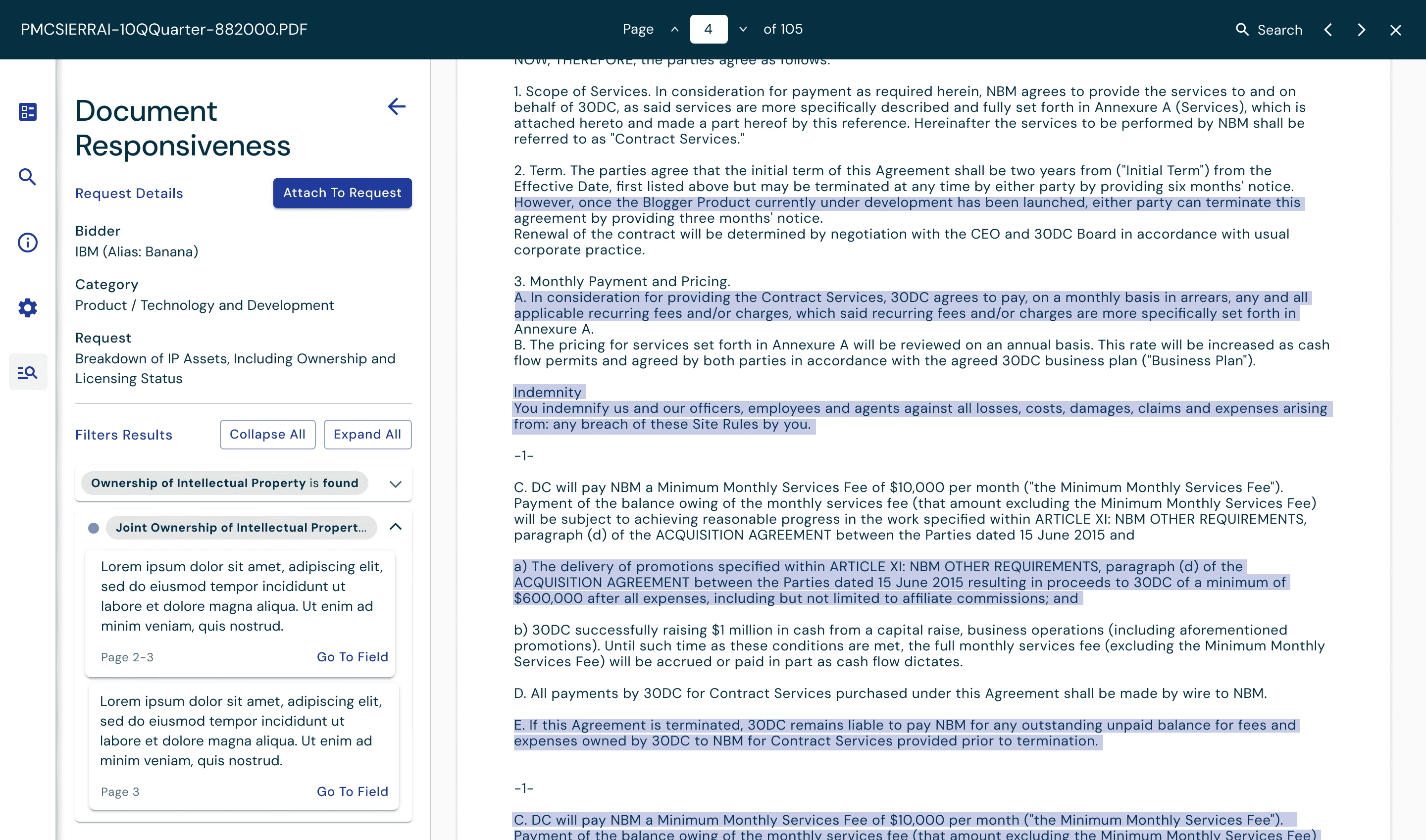
I designed this panel to make sure user could see the search results in context with request details.

I designed this panel to make sure user could see the search results in context with request details.

I designed this panel to make sure user could see the search results in context with request details.

Expected impact

The product has shipped, but we’re still in the early stages of customer adoption, so we don’t yet have enough real-world usage data to quantify impact. Instead, this section reflects the outcomes we designed for and the signals we expect to see as adoption grows.

Fewer surprise deal delays

With pre-screening that flags risky contract language early, teams should be able to surface and address issues before they become blockers late in the process.

Significant time and cost savings

By automating manual tasks like renaming files and sorting documents into the right folders, teams should spend far less time on repetitive admin work and more time moving the deal forward.

Faster responses to buyer requests

By recognizing duplicate requests and allowing teams to reuse answers, we expect fewer duplicate efforts and quicker turnaround on repeat questions.

Preserve business productivity

By reducing manual diligence work, we expect senior leaders to spend less time on deal admin and more time running the business.

Expected impact

The product has shipped, but we’re still in the early stages of customer adoption, so we don’t yet have enough real-world usage data to quantify impact. Instead, this section reflects the outcomes we designed for and the signals we expect to see as adoption grows.

The product has shipped, but we’re still in the early stages of customer adoption, so we don’t yet have enough real-world usage data to quantify impact. Instead, this section reflects the outcomes we designed for and the signals we expect to see as adoption grows.

Fewer surprise deal delays

With pre-screening that flags risky contract language early, teams should be able to surface and address issues before they become blockers late in the process.

Significant time and cost savings

By automating manual tasks like renaming files and sorting documents into the right folders, teams should spend far less time on repetitive admin work and more time moving the deal forward.

Faster responses to buyer requests

By recognizing duplicate requests and allowing teams to reuse answers, we expect fewer duplicate efforts and quicker turnaround on repeat questions.

Preserve business productivity

By reducing manual diligence work, we expect senior leaders to spend less time on deal admin and more time running the business.

Enter password to view project